Dimensioning Plan
Dimensioning plans for all mounting surfaces on which PV modules are found will be automatically generated when closing the 3D visualization. One mounting surface is enough for this.
The dimensioning plans are then displayed in PV*SOL premium in the tab "Plans" and output in the project report.
Additionally, it is possible to display the dimensioning plan continuously during the 3D planning operation for verification purposes. The toolbar "Display" is available in the tabs "Object view", "Module mounting" and "Module elevation". The dialog "Plan" is opened by clicking the button ..

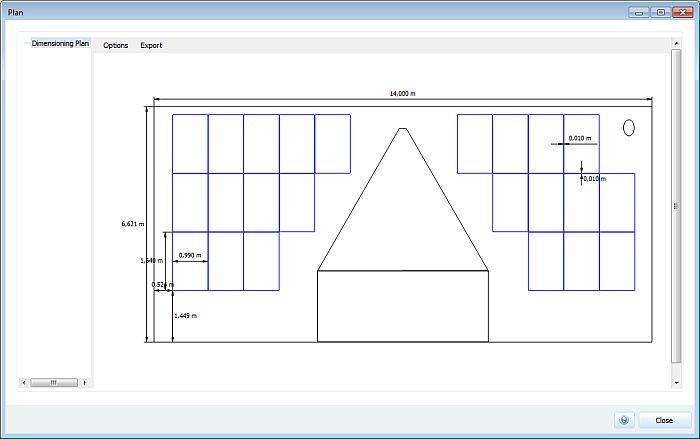
The outlines of the mounting objects and the restricted objects are depicted in black and the PV modules in blue in this dialog. The module rows are also shown for elevated installations. In this case, the PV modules portrayed are projections.
Furthermore, the following dimensioning plans are displayed in the plan:
Roof parallel system:
- Dimensions of all differing roof edges
- Distance of first module shape to left and to lower roof edge
- The dimensions (width x length) of a module
- The horizontal and vertical module spacing
Mounted System:
- Row Spacing
- Orientation to mounting surface with example using a module row
The dimensioning layer can be shown/hid with the "Options" menu item.
The plan can be exported in various ways with the "Export" menu item (see also -).