Before
After

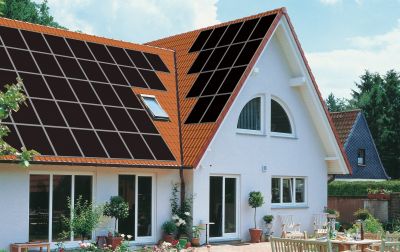
Page PV module > Preview of the roof configuration with Photo Plan
Using Photo Plan, you can create a photorealistic plan of your roof areas. The number of modules, tilt angle and coordinates are determined by Photo Plan. You can apply these values in your project. They need not necessarily coincide with the number of modules of the project. For example, if dummy modules are included in the photo preview.
Photo Plan has its own help function which you can access directly in Photo Plan.
-> How to proceed:
The program Photo Plan is opened.
There are two detailed instructional videos on how to use Photo Plan (see below). It is recommended that you view the introductory video.
With just a few entries on the geometry of the roof, it is possible to gain an impression of the future look of the roof areas. You require only a photo of the roof. Photo Plan imports the dimensions for the selected module from PV*SOL®.
In T*SOL® you can export the roof with some solar thermal modules as a Photo Plan project, and import it into PV*SOL in order to fit the remaining area with photo-voltaic modules in PV*SOL®. Of course, you can also do this in the reverse order.
In addition, Velux® skylights and Braas® roof tiles can be included and displayed.
The finished photo, number and inclination of modules will be adopted by PV*SOL®.
èSee also
Photo Plan - Introductory video: http://valentin-tutorials.s3.amazonaws.com/PhotoPlanTutorials/EN/PhotoPlan_EN_1/PhotoPlanEN1.html
Photo Plan - Advanced functionality: http://valentin-tutorials.s3.amazonaws.com/PhotoPlanTutorials/EN/PhotoPlan_EN_2/PhotoPlanEN2.html
|
Before |
|
After |
|
|
|